

SMS API for AI Agents: Send and Receive Texts with MCP, CLI or REST
Build an SMS API for AI agents workflow with MCP, CLI or REST. Send texts, handle replies and receipts, and plan New Zealand delivery.
An SMS API for AI agents needs to support sending texts, receiving customer replies and reading delivery outcomes. If the send request succeeds but the message never arrives, the agent must not claim the customer got it. With Jungledrum, your AI sends the message itself, through MCP, CLI, editor, REST or SMPP. Delivery receipts and replies come back to your own webhook, shaped by a field map you control: receipts your agent can read.
For a booking assistant, that means sending “Can you make your appointment on Thursday?”, reading “Friday instead” when the customer replies, and updating the booking only if the business rules allow it. The SMS message API carries a conversation, including what happens after the first text.
What an agent-ready SMS API needs
The send operation starts the exchange. The agent also needs to know what happened afterward. Treat these as separate events:
Event | What the agent can safely infer | Sensible next action |
|---|---|---|
Send request accepted | The platform accepted the request for processing, not that the customer received a text | Store the message reference and await an outcome |
Delivery receipt received | The messaging system has an outcome for that message | Update the conversation state according to the receipt |
Inbound reply received | The customer sent a response | Read it in the context of the existing conversation before acting |
Link each event to a customer, a conversation and the outgoing message. Without those links, an agent may attach “yes” to the wrong appointment or mistake an old receipt for a new delivery. Record message identifiers and timestamps. Handle repeated event notifications without triggering the booking action twice.
Before you automate an SMS messaging API, identify the reference that ties a receipt to a send, the fields that identify an inbound conversation and the outcomes that close a message's delivery state. Authenticate incoming events using the provider's documented mechanism. Store the raw event alongside the state change so someone can investigate a disputed outcome.
Keep request acceptance, delivery outcome and customer response as distinct states. A successful API call does not establish delivery. Until a receipt arrives, the delivery outcome remains unknown.
"A
statusof zero in the API response does not indicate that Vonage delivered your message." - Vonage SMS API documentation
Choose the integration path that fits your agent
Jungledrum supports MCP, CLI, editor, REST and SMPP: AI-native or traditional. Pick an entry point based on where the agent runs and how much control your existing application needs.
Integration | Good fit | What to keep under your control |
|---|---|---|
MCP | An agent using tools to initiate messages and consume conversation context | Tool permissions and allowed recipients |
CLI | A developer or coding agent testing a workflow from a terminal | Test recipient lists and execution logs |
Editor integration | A developer building the messaging flow inside a coding environment | Review of generated integration code |
REST | An application or agent service that owns orchestration | Authentication, event handling and persistent state |
SMPP | An existing messaging system with established SMPP processes | Mapping platform events into the agent's conversation model |
Use MCP when the agent calls messaging tools as part of its task. REST suits a service that decides when to send, stores the conversation and reacts to incoming events. The CLI and editor integration help during development. SMPP lets an established messaging stack join the workflow without replacing its transport layer.
Put a policy layer between the language model and the send action. The agent can propose the recipient and message; your application should enforce consent, recipient scope, approved templates where appropriate and limits on repeated sends. Keep credentials out of prompts and logs. Set those controls alongside your provider's acceptable-use rules.
Build the send, reply and receipt loop
Start with a narrowly defined action, such as confirming a New Zealand customer appointment. The agent should have the booking reference and the customer's permitted contact number before it sends anything.
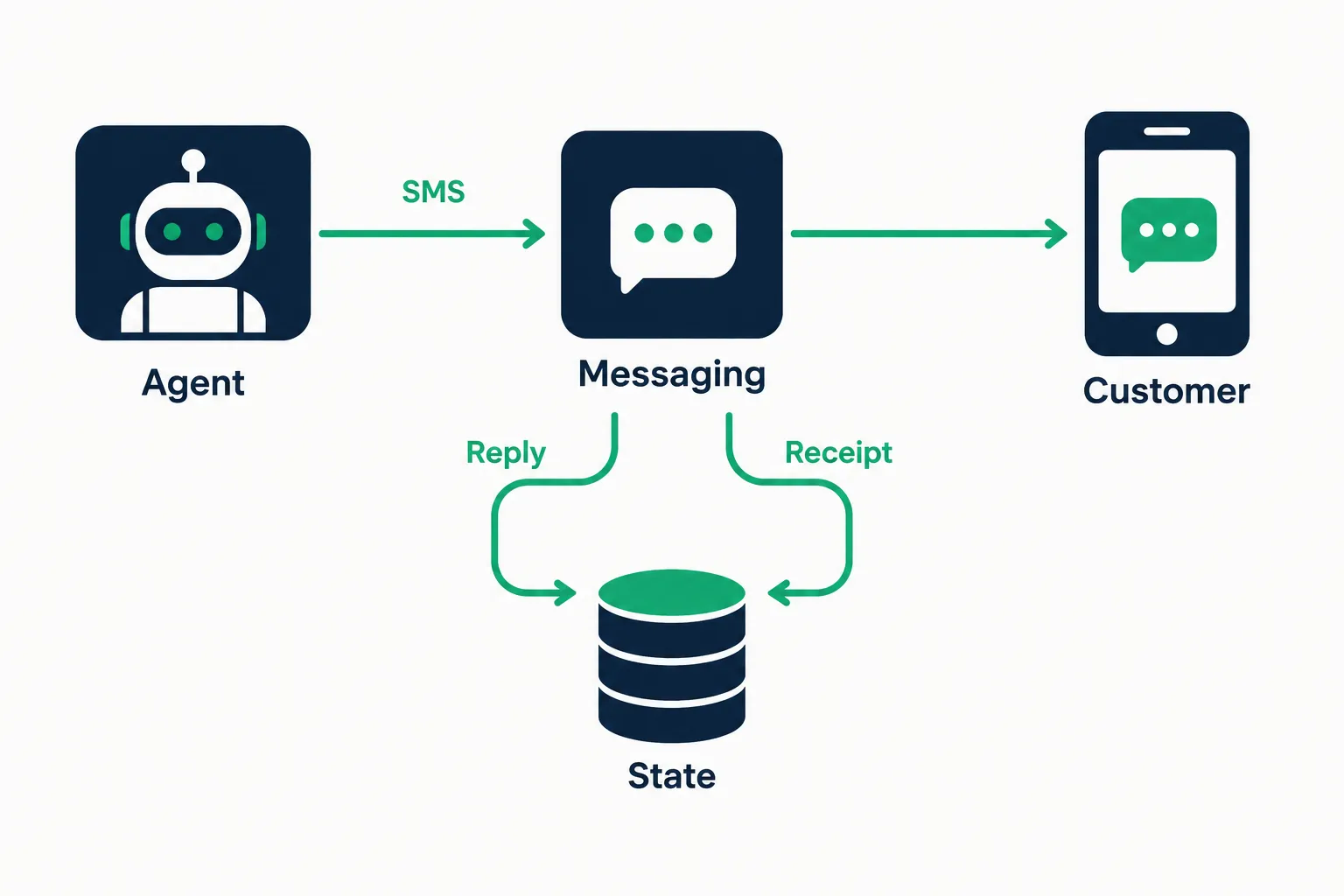
Decide whether to send. Confirm that the customer is eligible for this message and that the appointment has not already been confirmed or cancelled.
Send and persist context. Pass the recipient, message and conversation reference through the selected integration. Store the returned message reference with the booking and the agent's intended next step.
Handle delivery separately. When a delivery receipt arrives, attach it to the outgoing message. Do not interpret an accepted request as a confirmed delivery.
Handle the reply. Associate the incoming text with the conversation. Let the agent interpret “Friday instead” against the appointment context, then fetch available times from your booking system before offering an alternative.
Escalate uncertain or sensitive cases. If the response is ambiguous, the booking cannot be changed or the customer asks for a person, hand over the thread rather than guessing.
This application-level pseudocode shows the flow without implying a specific vendor endpoint or SDK:
on_booking_reminder(booking): if not allowed_to_message(booking.customer, booking): return result = messaging.send(booking.customer, reminder_text(booking)) save_message(result.reference, booking.id, state="accepted") on_delivery_event(event): message = find_message(event.message_reference) if already_processed(event): return update_delivery_state(message, event.outcome) on_inbound_message(event): conversation = find_conversation(event.sender, event.conversation_reference) if already_processed(event): return intent = agent.interpret(event.text, conversation.context) apply_business_rules_or_escalate(intent, conversation)
Store state in your application rather than relying on the model to remember every message. A receipt can arrive before or after other application work, and a customer can reply long after the initial request. The persisted thread lets the agent resume with the exchange in view.
Test the unhappy paths before a live send
Run the workflow against a small permitted test group. Include an unclear reply, a duplicate event, a delayed receipt and a customer who asks to stop receiving texts. Each case needs a predictable response. The agent must avoid acting twice, claiming delivery without a receipt or messaging someone who has withdrawn permission. Give a person a way to review exceptions.
New Zealand delivery and sender setup
For New Zealand customer messaging, the route behind a text message API matters as much as the integration. Jungledrum offers carrier-grade New Zealand delivery over legitimate routes. Never a grey route.
New Zealand recently opened six-digit short codes, and we run the whole process for you. A short code gives a business a recognisable sender, but getting one is separate from API development, so plan your agent's test workflow in parallel.
Prove the receive-and-receipt loop with a small permitted test group before introducing the final sender into a customer-facing workflow. Do not treat a successful test send as sender approval.
Define which messages customers have agreed to receive and what the agent should do with a request to stop. Verification codes, operational alerts, support replies and sales follow-ups do not all share the same customer expectation. Your policy should reflect the purpose of each message, and the conversation should preserve the reason it was sent. For customer trust, know how to recognise and report scam texts in New Zealand.
One conversation, more than one channel
SMS reaches a customer's phone; the agent still needs the context of conversations on other channels. Jungledrum offers SMS, RCS, email, chat and voice capabilities. Keep the conversation history in your application so the agent can read the earlier exchange before it answers, whichever channel the customer used.
Say a customer starts in chat about an appointment, receives an SMS reminder and texts back to reschedule. If your application links the chat exchange and the SMS reply to one conversation, the agent can respond without asking for the booking details again. The booking system and its rules still decide whether a change is possible.
That separation matters for other uses too:
Customer support: give the agent the open case and prior messages before it answers a text.
Lead qualification: store what the customer actually said and route an uncertain lead to a person.
Operational alerts: attach delivery outcomes to the incident rather than counting accepted requests as reached customers.
Verification codes: keep the code lifecycle and verification decision in the application, not in an open-ended agent conversation.
How to choose an SMS API for an AI agent
To choose the best SMS API for your agent, trace a customer exchange from the initial send through the delivery outcome, reply and resulting business action. That exercise shows whether the integration supports the whole workflow.
Ask these questions:
Can the agent read outcomes? Look for delivery receipts and inbound replies that can be associated with the outgoing message and customer thread.
Can you use your current stack? Match MCP, CLI or editor-based development to AI-native teams; use REST or SMPP where an existing service already owns the workflow.
Can you enforce business rules? Keep consent, access controls, duplicate handling and handoff outside free-form model output.
Does the route suit the destination? For New Zealand business texts, require legitimate routes and a workable sender plan, including short-code provisioning if that is part of the programme.
Will context survive a channel change? A shared thread makes replies more useful when the customer also interacts through RCS, email, chat or voice capabilities.
For one-way alerts, an API to send text messages may be enough. An agent that books, supports or qualifies customers also needs to receive and interpret the next event.
Conclusion
Choose a messaging layer that gives the agent the full conversation and its delivery outcomes. Jungledrum suits teams building New Zealand-facing agents that need carrier-grade delivery over legitimate routes, receipts the agent can read, and MCP, CLI, editor, REST or SMPP integration. Start with one permitted conversation flow and prove that the agent handles receipts and replies before giving it more actions.